Create New Recurring Donation Account
Visit the NSL4A Recurring Donation page.
Select your recurring donation amount and frequency in the Recurring Donation Form.
Note: The form defaults to $50, but you may select a custom amount.
Please consider covering the processing fees to help offset NSL4A’s costs.
Create a new donor account when prompted.
Confirm your new recurring donation and account.
Cancel PayPal Recurring Donation
Log in to your PayPal account: https://www.paypal.com/us/home
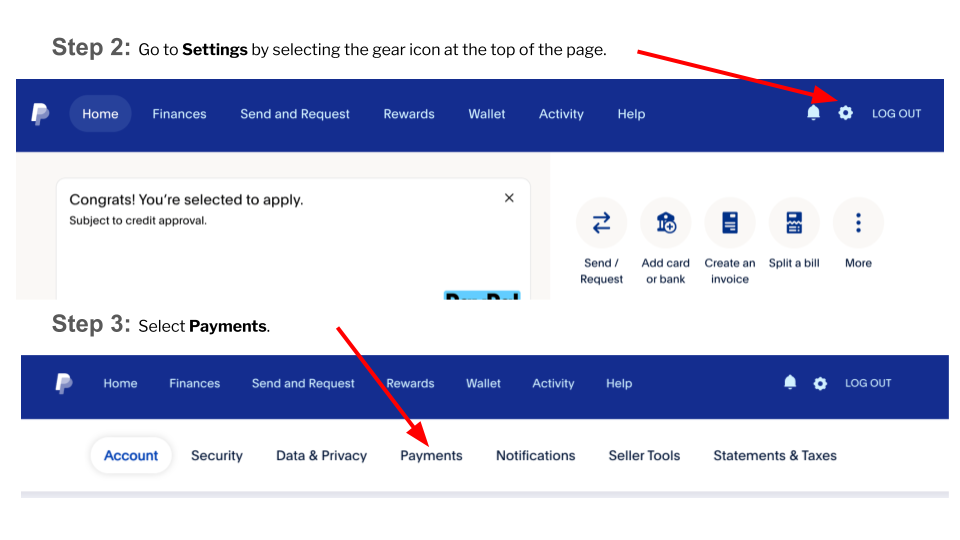
Go to Settings by selecting the gear icon at the top of the page.
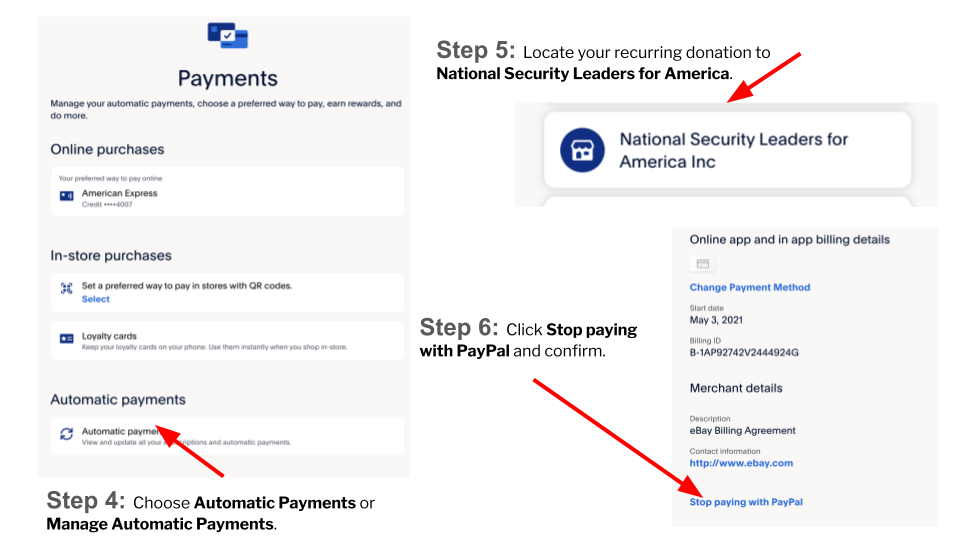
Note: See screenshot images below.
Select Payments.
Choose Automatic Payments or Manage Automatic Payments.
Locate your recurring donation to National Security Leaders for America.
Click Stop paying with PayPal and confirm.
Canceling PayPal Instructions